
Reviews
By: Venkat - Rating: 5 ( )
Enrolling in NetSuite Technical training at ERP Online Training.com was a wise decision. The trainers were experts in the field and delivered the content effectively. The course covered a wide range of topics, and I gained practical skills that have been valuable in my career. Highly recommended
Add Your Review
NetSuite Technical Training in Hyderabad and Bangalore
What is NetSuite Technical?
NetSuite Technical refers to the specialized skills and knowledge required to customize, configure, and manage NetSuite Enterprise Resource Planning (ERP) systems. This includes tasks such as creating custom workflows, designing reports and dashboards, integrating with other software systems, and ensuring the ERP system meets the unique needs of an organization. NetSuite Technical experts play a crucial role in optimizing and tailoring NetSuite solutions to improve business processes and drive operational efficiency.
Advantages of NetSuite Technical Skills
NetSuite Technical skills offer several key advantages:
- Customization and Optimization: Tailor NetSuite ERP solutions to align with specific business requirements.
- Career Opportunities: High demand for experts who can customize NetSuite implementations opens up lucrative career prospects.
- Enhanced Efficiency: Create custom workflows, reports, and dashboards that streamline business processes and improve decision-making.
🌟 Master NetSuite Technical Expertise with Online Training in Hyderabad and Bangalore! 🌟
Ready to elevate your career in enterprise resource planning (ERP)? Join our comprehensive NetSuite Technical Online Training program at ERP Online Training.com, available in Hyderabad and Bangalore.
🚀 Why Choose Us? 🚀
- Certified Instructors: Learn from NetSuite-certified professionals with extensive ERP system experience.
- Flexible Learning: Access training modules online at your convenience to fit your busy schedule.
- Practical Application: Gain hands-on experience with real-world NetSuite configurations, customizations, and integrations.
- Certification Preparation: Receive resources and guidance to help you prepare for NetSuite certification exams.
- Career Enhancement: Open doors to roles in ERP implementation, customization, and administration.
📚 What You’ll Learn 📚
Our curriculum includes:
- Introduction to NetSuite
- NetSuite data modeling
- SuiteScript for scripting and automation
- Customization and workflow management
- Integration with third-party applications
- Reports and dashboards creation
- User management and security
- Real-world NetSuite projects
🎓 Who Should Attend? 🎓
This training is ideal for:
- ERP Professionals
- Software Developers
- Business Analysts
- System Administrators
- IT and Finance Enthusiasts
- Anyone eager to excel in NetSuite Technical skills
📅 Enroll Today! 📅
Don’t miss the chance to become a NetSuite Technical Expert! Enroll now at ERP Online Training.com, with options available in Hyderabad and Bangalore.
NetSuite Technical Course Content

Day 1- SuiteScript API Overview
Day 2- Interacting With NetSuite Data
Day 3- Script Types
Day 4- Client Script
Day 5- User Event Script
Day 6- Map Reduce Script
Day 7- Suitelet Script
Day 8- Schedule Script
Day 9- RESTLet Script
Day 10- Portlet Script and Bundle Installation Script
Day 11- Mass Update Script and Workflow Action Script
Day 12- Debugging Scripts
Day 13- Best Practices
Day 14- Q & A
Day 15- Final Review and Conclude
Day 1: SuiteScript API Overview
What is SuiteScript?
SuiteScript is a JavaScript-based API that allows developers to extend NetSuite’s functionality. It enables customizations such as user interface modifications, automated workflows, and integrations with external data sources.
Uses of SuiteScript
- Custom Business Processing: Automate tasks like updating, creating, or deleting NetSuite records.
- Validations and Calculations: Perform custom validations and calculations within the browser.
- Custom User Interfaces: Create tailored user interfaces for enhanced user experience.
- Batch Processes: Execute batch processes to handle large volumes of data.
- NetSuite Searches: Run complex searches to gather specific data.
- Utility Processing: Send emails, create files, and work with XML documents.
- Custom Dashboards: Develop custom portlets for dashboards.
- Bundled Solutions: Implement processes in target accounts for bundled solutions.
What is SuiteScript API?
SuiteScript API provides access to NetSuite’s data and functionality. It is organized into:
- SuiteScript Functions: Predefined functions for interacting with records and fields.
- Objects: Data structures used in scripts, such as records and fields.
Documentation: Available in NetSuite Help by searching for “API”.
Running Scripts in NetSuite
- Create a JavaScript File: Write the script code.
- Upload the File: Use NetSuite’s interface to upload the script file.
- Create a Script Record: Navigate to Customization > Scripting > Scripts > New.
- Define Script Runtime Options: Configure deployment settings on the Script Deployment page.
Day 2: Interacting with NetSuite Data
Scripting Records
- Record APIs: Used to create, delete, copy, or load records. Apply to standard and custom records.
Standard vs. Dynamic Mode
- Dynamic Mode: Executes record operations in real-time, including sourcing, validation, and recalculation without submitting the record first.
- Standard Mode: Executes business logic only after the record is submitted.
Working with Fields
- Field APIs: Allows setting and retrieving values for both standard and custom fields.
- Field Types:
- Body Fields: Main fields on the record.
- Sublist Fields: Fields within sublists.
Working with Sublists
- Editor Sublists: Dynamic sublists where users can add, edit, or remove lines before form submission.
- Inline Editor Sublists: Similar to editor sublists but support inline editing.
- List Sublists: Static sublists with fixed line items.
- Static List Sublists: Read-only and used for displaying associated data.
Example API Call: nlapiSetLineItemValue('item', 'item', 2, '22');
Working with Subrecords
- Subrecords: Contain elements similar to standard records and are managed within the context of a parent record.
- APIs for Subrecords: Used for creating, editing, and accessing subrecords within a parent record context.
Day 3: Script Types
Script Types
Scripts are categorized based on their execution environment:
- Client-Side: Run in the user’s browser.
- Server-Side: Run on NetSuite’s server.
Script Types Include:
- Client Script
- User Event Script
- Map/Reduce Script
- Suitelet Script
- Scheduled Script
- Portlet Script
- Mass Update Script
- Workflow Action Script
- Bundle Installation Script
Day 4: Client Script
Overview
Client Scripts execute in the browser and are used for:
- Validating User Data: Ensure data accuracy and integrity.
- Auto-Populating Fields: Automatically fill fields based on user actions.
- Sourcing Data: Retrieve data from external sources.
Client Event Functions
- Page Load: When a user loads a NetSuite form.
- Field Change: When a field is updated.
- Form Submission: When the user submits a form.
- Line Item Changes: When lines are added or removed in sublists.
Form-Level vs. Record-Level Scripts
- Form-Level Scripts: Specific to fields and forms.
- Record-Level Scripts: Apply globally to an entire record type.
Example Script (Pageinit Event):
function pageinit() {

    alert('Hi, This is my pageinit function');

}
Note: Displays an alert when the page is loaded.
Day 5: User Event Script
Overview
User Event Scripts run on the NetSuite server and are triggered by:
- Create, Edit, Delete, and Copy Actions: Executed when a record undergoes these operations.
User Event Types
- Before Load: Triggered before a record is loaded.
- Before Submit: Triggered before changes are committed to the database.
- After Submit: Triggered after changes are committed.
Example Script (After Submit Event):
function afterSubmit(type) {

    if (type == 'create') {

        var newId = nlapiGetRecordId();

        var newType = nlapiGetRecordType();

        nlapiLogExecution('DEBUG', '<After Submit Script>', 'type: ' + type + ', RecordType: ' + newType + ', Id: ' + newId);

    }

}
Output: Logs details after creating a new sales record.
Day 6- Map/Reduce Script
- Map/Reduce Script
- Entry Points
- Governance
- Map/Reduce Script
- The map/reduce script type is designed for scripts that need to handle large amounts of data.
- It is best suited for situations where the data can be divided into small, independent parts.
- Map/reduce scripts offer several advantages over scheduled scripts. One advantage is that, if a map/reduce job violates certain aspects of NetSuite governance, the map/reduce framework automatically causes the job to yield and its work to be rescheduled for later, without disruption to the script.
- Map/Reduce Entry Points
- Type
- Suitelet Example
Day 7- Suitelet Script
- Suitelet Scripts
- Type
- Suitelet Example
- Suitelet
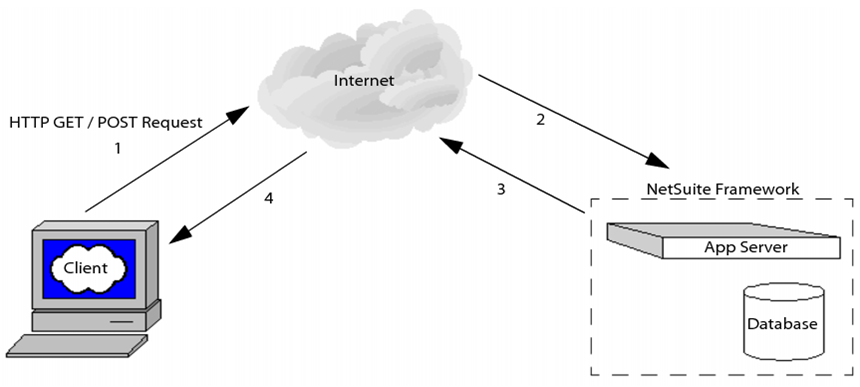
- Suitelets are server-side scripts that operate in a request-response model. They are invoked by HTTP GET or POST requests to system generated URLs.
- Suitelets are used to create the additional custom NetSuite pages.
- Suitelets are also used to get the information at backend .
- Suitelet
- When building Suitelets, developers can use Suite Script UI Objects to create custom pages that look like NetSuite pages. Suite Script UI objects encapsulate the elements for building NetSuite-looking portlets, forms, fields, sublists, tabs, lists, and columns.
- Back end Suitelet Uses
- Providing a service for backend logic to other Suite Scripts, or to other external hosts outside of NetSuite
- Offloading server logic from client scripts to a backend Suitelet shipped without source code to protect sensitive intellectual property
- Suitelet Script Execution
- External Available Suitelet
- Suite let can available only when set to Available Without Login on the Script Deployment page but only some of Suite Script API are supported.
- UI access for Suitelet
- if you want users to be able to access/launch a Suitelet from the UI, you can create a menu item for the Suitelet.
- The following figure shows the Links tab on the Script Deployment page for a Suitelet. Select the Center where the link to the Suitelet will be accessible (for example, Customer Center, Vendor Center, etc). Next, set the Section (top-level menu tab) in the Center, then choose a category under the section. Finally, create a UI label for the link. Be sure to click Add when finished.
- UI access
- UI access
- Suite let Forms
- List Suitelet
Day 8- Schedule Script
- Scheduled Script.
- Scheduled script sample
- Scheduled Script
- Scheduled scripts run on the NetSuite server. Compared to user event scripts, scheduled scripts are given a higher limit of usage governance. Therefore, scheduled scripts are ideal for long running tasks and batch jobs.
- Scheduled script can be invoked by API for immediate execution.
- Scheduled Script Execution
- Whether a scheduled script is executed “on-demand” for immediate execution, or it scheduled to run in the future, once a script has been placed into the NetSuite scheduling queue, it is executed serially on a per-company basis. In other words, there is a single queue used by all scheduled scripts in your company’s NetSuite account. As soon as one script completes, the next script in the queue is immediately executed.
- A scheduled script may not run at precisely the time it was scheduled if there are multiple long-running scripts before it in your company’s queue. The first of your company’s scripts to be placed in the queue will be the first script to run. Although multiple scheduled scripts can exist in the queue, only a single script can be executed at any given time.
- Scheduled Script Execution
- For example, if your company has scheduled two scripts to start at 10:00 p.m., the second script that was also set to run at 10:00 p.m. will not start until the first script completes. Once the first script completes, the second script will execute immediately.
- Scheduled Script Statuses
- In Queue: The script is in the NetSuite scheduling queue and is waiting to be run.
- In Progress: The script is currently running.
- Completed: The script was successfully deployed and executed. The user must manually change the script’s deployment status to either Scheduled or Not Scheduled before the script can be run again.
- Scheduled: If the script has been set to execute on a recurring basis, the script’s deployment status will appear as Scheduled after it executes. The script will then be re-run at its specified time(s).
- Scheduling Script
- Scheduled scripts with a deployment status set to Scheduled can be set to run once at a pre-defined time in the future, or they can be scheduled to run on a more regular daily, weekly, monthly, or yearly basis. Note that deployment times can only be scheduled in 30 minute intervals, for example 2:00 pm., 2:30 pm., 3:00 pm.
- Scheduling Script
- Scheduled Scripts Using nlapiScheduleScript
- You can programmatically run a scheduled script using the nlapiScheduleScript API. Be sure that the script’s deployment status appears as either Not Scheduledor Completed on the Script Deployment page.
Using nlapiScheduleScript you can:
- Place a currently executing scheduled script back into the scheduling queue.
- Call another scheduled script from within a scheduled script. When the new script is called, it is then put into the scheduling queue.
- Place a scheduled script into the queue from another script such as a user event script or a suitelet.
- Scheduled Scripts Using nlapiScheduleScript
- if nlapiScheduleScript is used in a scheduled script to call anotherscheduled script, instruction count limits are applied to eachscript separately, since (technically) you are running two different scheduled scripts. In other words, both “scheduled script A” and “scheduled script B,” which was called by “scheduled script A” can each contain 10,000 units.
- Recovery Points in Scheduled Scripts
- NetSuite gives developers the ability to create recovery points in scheduled scripts when a failure occurred in script.
- These recovery points allow the state of the script at a certain point to be saved. In the event of an unexpected system failure, the script can be restarted from the last successful recovery point
- Recovery Points in Scheduled Scripts
- To set a script recovery point, use nlapiSetRecoveryPoint(). When the system restarts, the script will resume where it left off.
- Developers can also use nlapiYieldScript(). In addition to setting a recovery point, this API places the script back into the scheduled script queue. Once the script moves to the front of the queue for processing, it begins its execution from the specified recovery point.
Day 9- RESTlet
- RESTlet script.
- RESTlet script example.
- RESTlet
- RESTlets, a new type of server Suite Script. This new API is a lightweight, flexible, and standards-based framework that provides an alternative to SOAP-based Web services. Developers can use RESTlets to define custom RESTful integrations with NetSuite.
- RESTlets
- RESTlets are a form of Web services integration. Each RESTlet is a server-side script that operates in a request-response model, and is invoked by an HTTP request to a system-generated URL.
- RESTlets follow the principles of the REST architectural style and use HTTP. They use HTTP verbs, HTTP headers, HTTP status codes, URLs, and standard data formats.
- RESTlets support the entire Suite Script API and general Suite Script features such as debugging
RESTlets provide the following additional benefits:
- Support of stateless requests and responses between client and server
- Built-in authentication using user credentials in HTTP header.
Day 10- Portlet Script and Bundle Installation Script
- Portlet Scripts
- Portlet Script examples
- Portlet Scripts
- Portlet scripts can be used to define and publish custom dashboard content.
- List , Form , HTML and Links are portlet script types.
- Portlet Types
- LIST – A standard list of user-defined column headers and rows.
- FORM – A basic data entry form with up to one submit button embedded into a portlet This type of portlet supports APIs to refresh and resize the portlet, as well as the use of record-level client-side script to implement validation.
- HTML – An HTML-based portlet, the most flexible presentation format used to display free-form HTML .
- LINKS – This default portlet consists of rows of simple formatted content.
- Portlet Script
- Be aware that the portlet type (LIST, FORM, HTML, LINKS) is not actually passed as a value in the portlet script itself, rather it is defined on the portlet Script record page (see figure below). Once you create your portlet .js file, you will load your .js file into the file cabinet, create a new script record for your file (Setup > Customization > Scripts > New > Portlet), and then select the portlet type from the Portlet Type drop-down menu.
- Portlet Script Examples
Day 11 Mass Update Script and Workflow Action Script
- Mass Update: Used to perform custom updates to record fields that are not available through general mass updates. Mass/update scripts are executed on demand only using the Perform Update button on the Mass Update Results Preview page
- Workflow Action: Workflow action scripts allow you to create custom Workflow Actions that are defined on a record in a workflowWorkflow action scripts are also useful when you need to create custom actions that execute complex computational logic that is beyond what can be done with the built-in actions
Day 12- Debugging Script
- You can use the Suite Script Debugger to debug server scripts. Server script types are user event, Suitelet, scheduled, and portlet scripts.
- Scripts which are in testing mode will debug in debugger(Suitelets or UE)
- Debugger
- Debugger UI
- There are five Debugger buttons that can be used to control/resume script execution once the Debugger stops at a particular line:
- Step Over: Resumes execution from the current line and stops at the next line (even if the current line is a function call).
- Step Into: Resumes execution from the current line and stops at the first line in any function call made from the current line.
- Step Out: Resumes execution from the current line until the end of the current function, and stops at the first line following the line from where this function was called -or- until the next break point -or- until the program terminates (either by error or by normal completion).
- Continue: Resumes program execution from the current line until the next break point -or- until the program terminates
- Cancel: Aborts execution of the program from the current line.
Day 13- Best Practices
- Code organization and structure
- Naming conventions
- Commenting
- Error and exception handling
- Script parameters
- Do not hard code values(URL, ID, Static)
- Logging
- Scripts Usage
- Schedule Script – 10,000
- User Event Script – 1,000
- Client Script – 1,000
- Suitelet Script – 1,000
- Restlet Script – 5,000
- Portlet Scripts – 1,000
- MassUpdate Script- 1,000 per Each record of the script
- Bundle Installation Scripts – 10,000
Day 14- Q & A
Day 15- Final Review and Conclude
Thank You!
FAQ’s
- What is NetSuite Technical Training, and why is it important to learn?
- Understanding the significance of NetSuite Technical Training in managing and customizing NetSuite ERP solutions can provide students with motivation to learn.
- Are there any prerequisites for enrolling in NetSuite Technical Online Training?
- Knowing if there are specific prerequisites or prior knowledge requirements can help students assess their eligibility for the course.
- What are the key topics covered in the NetSuite Technical training syllabus?
- Understanding the course content helps students assess its relevance to their career goals.
- Is there hands-on practice or practical exercises included in the training program?
- Hands-on experience is valuable for students to gain proficiency in NetSuite technical tasks, so they may inquire about this aspect.
- Are there any certification preparation materials or guidance provided in the training?
- Certification can validate skills, so students might want to know if the training supports this goal.
- What is the mode of training delivery—is it live instructor-led, self-paced, or a combination?
- Knowing the training format helps students choose a mode that suits their learning preferences and schedules.
- What resources and materials are provided to support learning, such as course materials, access to NetSuite, or practice projects?
- Access to learning resources is essential for student success, so they may inquire about these.
- Is there any job placement assistance or career support offered after completing NetSuite Technical Online Training?
- Career support can be crucial for students seeking job opportunities in NetSuite technical roles.
- What is the duration of NetSuite Technical Online Training, and what is the schedule like?
- Knowing the training duration and schedule can help students plan their time effectively.
- What are some potential career paths or roles that proficiency in NetSuite Technical can lead to?
- Understanding potential career opportunities helps students set their expectations and goals.
What is the best institute to learn NetSuite Technical online in Hyderabad?
For comprehensive NetSuite Technical training in Hyderabad, look no further than ERP Online Training.com. They offer top-quality courses that encompass all aspects of NetSuite Technical, catering to beginners and experienced professionals alike. With experienced trainers and hands-on projects, you’ll gain valuable skills for implementing and managing NetSuite solutions. ERP Online Training.com is the best choice for NetSuite Technical online training in Hyderabad.
What is the best institute to learn NetSuite Technical online in Bangalore?
The best institute to learn NetSuite Technical online in Bangalore is “ERP Online Training.com.” They offer comprehensive NetSuite Technical training with experienced instructors and hands-on projects. The institute is known for its quality education, flexible schedules, and industry-relevant curriculum, making it a top choice for NetSuite Technical training in Bangalore.
Quick Enquiry